On this page
Saving a video from the internet is safe in itself. A video file is like a photo: your phone reads it and shows it, and that's all it can do. The trouble comes from the sites around it, the ones built to trick you into installing something, typing a password or allowing a flood of pop up ads.
The good news is that bad sites give themselves away fast. This lesson shows you the signs, so you can judge any downloader, including ours.
What can actually go wrong
Most people worry about the wrong thing. The video you download is very rarely the problem. These are the real risks, roughly from most to least common:
- Fake download buttons. Big green buttons inside ads that lead to something else entirely.
- Notification spam. A site asks to "allow notifications to continue" and then fills your screen with fake warnings for weeks.
- Installers. You are told to get a "player", "codec" or "download manager" before you can save one video. That program is the real product, and it often comes with adware.
- Password traps. A page asks you to "log in with Instagram" to see a private video. It is collecting your password.
- Endless redirects. Every click opens a new tab somewhere you never wanted to go.
None of these needs the video at all. They are tricks layered on top of a download page.
A video file can't hurt you, a program can
The quickest safety check is the end of the file name, called the extension. Video and audio files end in one of these:
- .mp4, .webm, .mov, .mkv for video
- .mp3, .m4a, .opus for audio
A file ending in .exe, .msi, .apk, .dmg, .bat or .scr is a program. A ZIP file can hide a program inside it. If you asked for a video and got one of these, delete it without opening it.
Show file extensions on Windows
Windows hides extensions by default, which is how a file called "funny video.mp4.exe" passes for a video. To see the real ending, open File Explorer, choose View, then Show, and tick File name extensions. It takes ten seconds and protects you on every download from now on.
Seven warning signs of a bad downloader
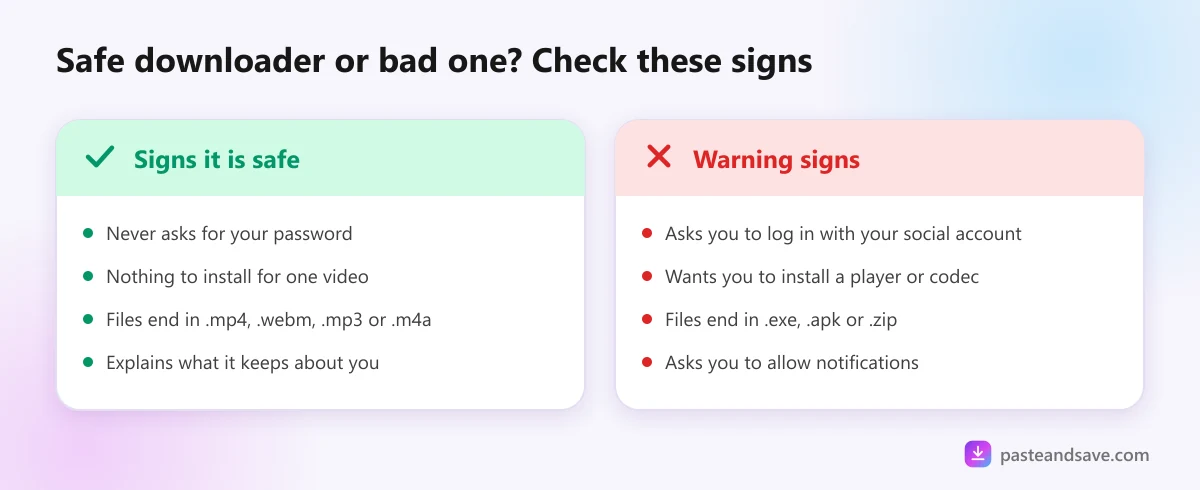
If you see any one of these, close the tab:
- It asks for your password to TikTok, Instagram, Facebook or any other site.
- It wants you to install an app, player, codec or extension before saving one video.
- The file you get is not a video or audio file.
- It asks to send you notifications.
- There are several download buttons, and the biggest ones are inside ads.
- Clicking anywhere on the page opens new tabs or windows.
- It promises things that aren't possible, such as private accounts or Netflix films. A tool can't reach what you can't watch while logged out, and paid streaming is copy protected.
The last one matters more than it looks. A site that claims to download private videos is either lying or asking for your login, and neither is good news for you.
What a safe downloader does with your data
A good site tells you plainly what it keeps. Here is how PasteAndSave works, as an example of what to look for:
- No accounts. There is nothing to sign up for, so there is no profile and no download history.
- The link you paste is held in memory for about ten minutes so the same link loads fast a second time, then it is discarded.
- The video file passes through our server on its way to you and is deleted afterwards, within fifteen minutes at most.
- Your IP address is used to stop one person from overloading the service for everyone else.
- Analytics and ads. The site uses Google Analytics and shows ads, both of which a normal content blocker can switch off without breaking the downloader.
All of this is in our privacy policy. If a downloader has no privacy policy at all, or one that says nothing specific, treat that as a warning sign of its own.
Staying safe on a phone
iPhone and iPad
You don't need any app to save a video. Safari downloads files on its own and puts them in the Files app. An App Store app that promises to download videos from social sites often gets removed, then comes back under a new name full of ads. The browser is the safer route. The iPhone and Android guide shows where files go.
Android
Never install an APK file from a download site. Apps from outside the Play Store skip Google's checks, and "video downloader" APKs are a favourite hiding place for adware. Chrome can save videos straight into your Download folder with no app at all.
If you already clicked something bad
Don't panic. Most problems are easy to undo:
- You allowed notifications. In Chrome, open Settings, then Privacy and security, then Site settings, then Notifications, and remove the site. Safari on a Mac has the same list under Settings, then Websites.
- You installed a program. Uninstall it, then run a full scan with Microsoft Defender on Windows or Play Protect on Android.
- You typed a password into a strange page. Change that password on the real site now, and turn on two step sign in.
- You downloaded a file but didn't open it. Delete it. An unopened file can't do anything.
You've finished the basics
That's all five lessons. You know how downloaders work, which quality and format to pick, what the rules are, and how to stay safe. Now put it to work with a guide for the app you use most:
Ready to try it?
Free, no sign up, works on any phone or computer.
Advertisement
Questions people ask
Can a video file give my phone a virus?+
A normal MP4, WebM or MP3 file is data that a player reads, not a program that runs, so on its own it can't install anything. The danger is a file that only pretends to be a video, such as one ending in .exe or .apk, or a site that pushes you to install an app.
Is PasteAndSave safe to use?+
PasteAndSave has no accounts, never asks for a password and never asks you to install anything to save a video. Files are MP4, WebM, MP3 or M4A, and the copy on our server is deleted within fifteen minutes. The privacy policy lists everything we keep.
Why does a download site want to send me notifications?+
Notification spam is a common way bad sites earn money. Once you allow it, the site can push fake virus warnings and ads to your screen even after you close it. A downloader never needs notifications to work, so always choose Block.
What should I do if I installed something from a download site?+
Uninstall it straight away, then run a full scan with Microsoft Defender on Windows or Play Protect on Android. If you typed a password into it, change that password on the real site and turn on two step sign in.