On this page
TikTok's own Save video button stamps the TikTok logo and the creator's username onto the file, and moves it around the corners while the video plays. It also adds a few seconds of TikTok branding at the end. Fine for a quick share, annoying if you want to watch it in your gallery or use it in an edit.
TikTok stores a clean copy of every video, the one its app actually plays. A downloader like PasteAndSave fetches that copy. Here is how to do it on any device.
On iPhone
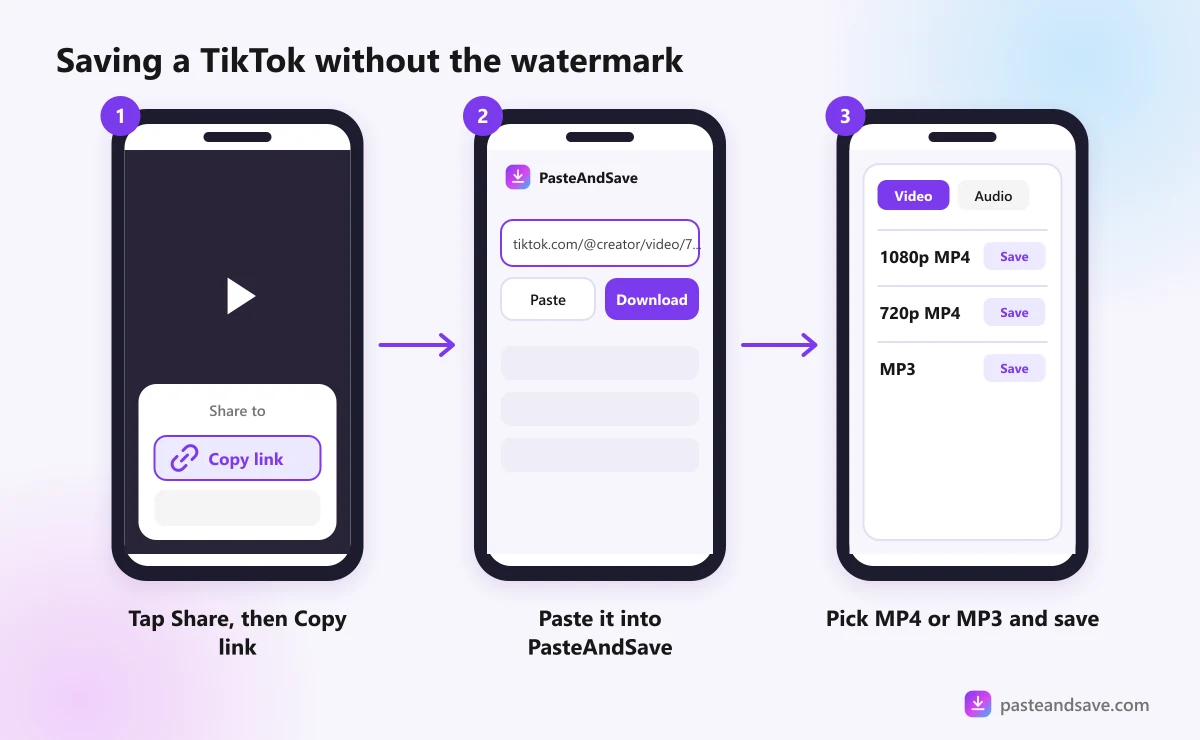
- In TikTok, open the video and tap Share, the arrow on the right side.
- Tap Copy link.
- Open Safari and go to the TikTok downloader.
- Tap the box, tap Paste, then tap Download.
- Pick a quality from the list. The highest is usually 1080p or 720p.
- Tap Download in the box Safari shows.
The video lands in the Files app, in the Downloads folder. To move it into Photos, open it in Files, tap the share icon and choose Save Video.
The iPhone and Android guide has more on where files go and how to find them.
On Android
- In TikTok, tap Share on the video, then Copy link.
- Open Chrome and go to the TikTok downloader.
- Long press the box, choose Paste, then tap Download.
- Choose a quality.
The file goes to your Download folder. Most gallery apps, including Samsung Gallery and Google Photos, show it there within a few seconds.
On a computer
- Open the video on tiktok.com, or right click it and copy the link.
- Paste it into the TikTok downloader and press Download.
- Pick a quality and the MP4 saves to your downloads folder.
If you save TikToks often on a computer, the PasteAndSave browser extension adds a download button to the page, so you skip the copy and paste.
Keep just the sound as an MP3
Trending sounds are half of TikTok. To keep only the audio:
- Paste the link as above.
- Open the Audio tab instead of picking a video quality.
- Choose MP3 for something that plays everywhere, or M4A to keep the original sound without converting it.
There is no point picking 320 kbps for a TikTok sound. TikTok stores audio at a modest bitrate, and a bigger MP3 cannot add quality that was never there. The MP3 guide explains bitrates in two minutes.
Photo slideshows
A slideshow is a post made of photos with music on top. Paste its link the same way. The photos are listed one by one so you can save the ones you want, and the music, where TikTok includes it, sits in the Audio tab.
When a TikTok won't download
These are the messages you are most likely to see, and what they mean:
- "This one is private." The account is private, or the video is set to friends only. Only the people it was shared with can see it.
- "This video was removed or is no longer available." The creator deleted it, or TikTok took it down.
- "TikTok doesn't show this post in our server's region." TikTok hides some videos from some countries, including the one our server is in. Nothing on your side will change that.
- "This needs a sign in to watch." TikTok asks for a login before showing some videos, often ones marked for adults.
The full list is in Why a Video Won't Download.
Be fair to the people who make them
A saved TikTok is great for watching offline, keeping a recipe or building a mood board. Posting it on your own account is a different thing. If a creator switched off TikTok's Save button, take that as a no, and ask before you save it. And if you want to repost, send a message first. The legal guide has a short message you can copy.
Ready? Copy a TikTok link and paste it into the TikTok downloader.
Ready to try it?
Free, no sign up, works on any phone or computer.
Advertisement
Questions people ask
Can I download TikTok videos without the app?+
Yes. Open the video on tiktok.com in any browser, copy the address, and paste it into a TikTok downloader. You don't need the app or a TikTok account for public videos.
Why is there no Save video button on some TikToks?+
Creators can switch off downloads for their videos. When the button is missing, that is the creator's choice, so ask them before saving or sharing the video.
What quality are TikTok downloads?+
You get the best version TikTok stores for that video, usually 720p or 1080p. A downloader cannot make it sharper than the upload, so a video filmed in low light or uploaded small stays that way.
Can I download a TikTok photo slideshow?+
Yes. Paste the slideshow link and the photos are listed so you can save them, and where TikTok includes the music, it shows up under the Audio tab.