On this page
A YouTube playlist is a page with a list of videos on it, not one big file. So a downloader can't hand you "the playlist". What it can do is read the list and let you pick the videos you want, each in the quality you want.
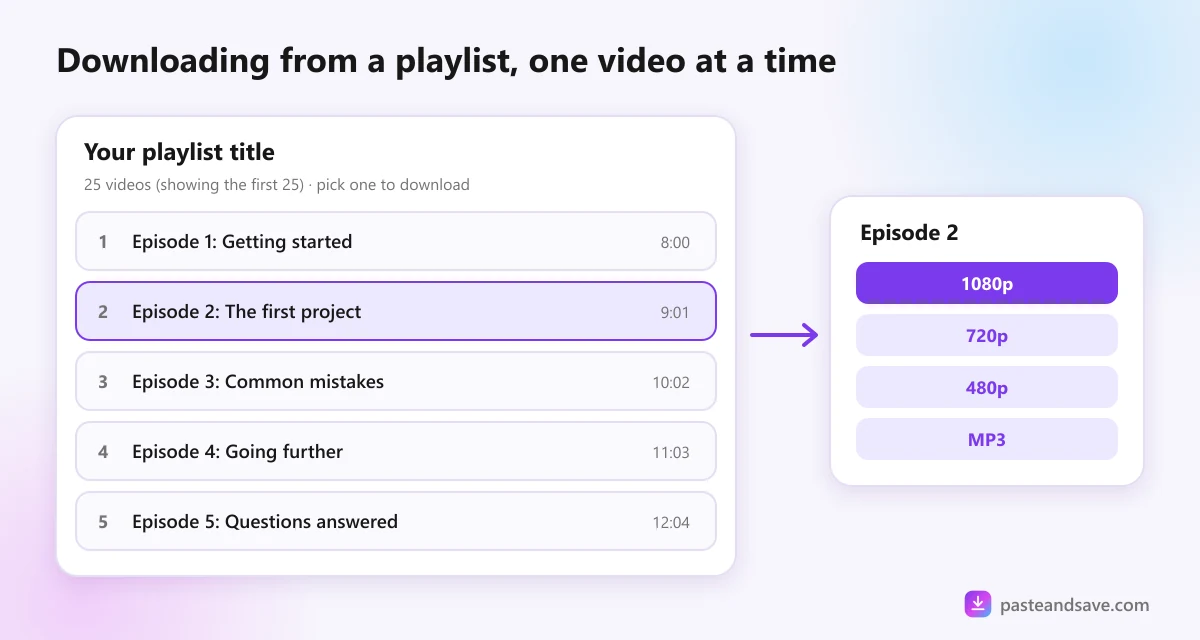
That is how PasteAndSave works. Paste a playlist link and you get its videos in a list. Tap one and you get the normal quality list for that video.
Copy the right link
This is where most people get stuck. There are two kinds of link, and they look alike:
- The playlist's own link. It contains the word playlist, like youtube.com/playlist?list= followed by a code. This is the one you want.
- A video playing inside a playlist. It starts with youtube.com/watch and also carries the playlist code. A downloader treats this as one video, because that is what it points to.
On a computer
Open the playlist's page, the one with the title and the full list of videos on it. Copy the address from the address bar. If you are watching a video in the playlist, click the playlist's title in the panel on the right to get to that page first.
On a phone
In the YouTube app, open You, then Playlists, and tap the playlist. On the playlist screen, tap Share, then Copy link. Sharing from inside a video gives you the video's link instead.
Paste it and pick a video
- Go to the YouTube downloader and paste the playlist link.
- Press Download. Instead of qualities, you see the playlist's title and its videos.
- Tap the video you want. Its quality list opens underneath, and the playlist stays on screen.
- Pick a quality and save it.
- Tap the next video in the list and repeat.
Each video saves as its own file, named after the video, so they stay easy to sort in your downloads folder.
Why 25 videos, and one at a time
Every video is fetched by our server and then sent on to you. A playlist of two hundred videos, all at once, would tie up the server for everyone else for a long time, and most people only want a few videos from a long list anyway.
So the list shows the first 25 videos, and you save the ones you need. If the playlist is longer, the list tells you it is showing the first 25. For a video further down, open it on YouTube and paste its own link.
Saving a playlist as MP3s
Music playlists and podcast series are the most common reason people want a whole playlist. The steps are the same:
- Paste the playlist link and tap a video.
- Open the Audio tab instead of picking a video quality.
- Choose MP3, or M4A to keep YouTube's own audio without converting it.
The MP3 guide explains bitrates. Short version: 128 kbps is fine for speech, and anything above 256 kbps only makes a bigger file, because YouTube's own audio is not that detailed.
Which playlists will open
- Public playlists open for anyone.
- Unlisted playlists open too, because anyone with the link can watch them.
- Private playlists don't, because only the owner can see them.
- Watch Later and Liked videos never open. YouTube keeps them private to your account, always.
Inside a public playlist, a single video can still be private, removed or age restricted. That video shows up in the list but won't download, while the others work normally. The YouTube guide covers those messages.
Be kind to the creators
A playlist is often someone's whole course or album. Saving a few lectures to watch on a train is one thing. Uploading the series somewhere else is another, and the legal lesson explains why. If a creator sells their course or music elsewhere, buying it is the best way to say thanks.
Ready? Copy the playlist's link and paste it into the YouTube downloader.
Ready to try it?
Free, no sign up, works on any phone or computer.
Advertisement
Questions people ask
Can I download a whole YouTube playlist at once?+
Not on PasteAndSave. A playlist opens as a list of up to 25 videos, and you save each one you want with its own quality. Saving one at a time keeps the server fair for everyone and lets you skip the videos you don't need.
Why does my playlist link open only one video?+
You copied the link of a video playing inside the playlist, not the playlist itself. Open the playlist's own page, the one that lists every video, and copy that address or use its Share button. The link should contain the word playlist.
Can I download my Watch Later or Liked videos playlist?+
No. Watch Later and Liked videos are always private to your account, so only you can see them while logged in. PasteAndSave never logs in, so it sees what any visitor sees, which for those lists is nothing.
How many videos does the list show?+
Up to the first 25 videos of the playlist. If the playlist is longer, the list says it is showing the first 25. For a later video, open it on YouTube and paste its own link instead.