On this page
Instagram's Save button, the little bookmark, doesn't save anything to your phone. It adds the post to a list inside the app, and the post disappears from that list the day the owner deletes it. To keep a Reel, a Story or a photo for real, you need it as a file.
What you can download
- Reels, with their sound, up to 1080p.
- Videos from the main feed.
- Photo posts, at full resolution.
- Carousels, the posts with several photos or videos you swipe through. Each item is listed separately.
- Public Stories, while they are still up. Stories disappear after 24 hours, so save them quickly.
All of these work only for public accounts. More on that below.
How to download a Reel on your phone
- Open the Reel in Instagram.
- Tap the paper plane icon, then Copy link. On some versions you tap the three dots first, then Copy link.
- Open your browser and go to the Instagram downloader.
- Paste the link into the box and tap Download.
- Choose a quality. The top one is usually the full 1080p version.
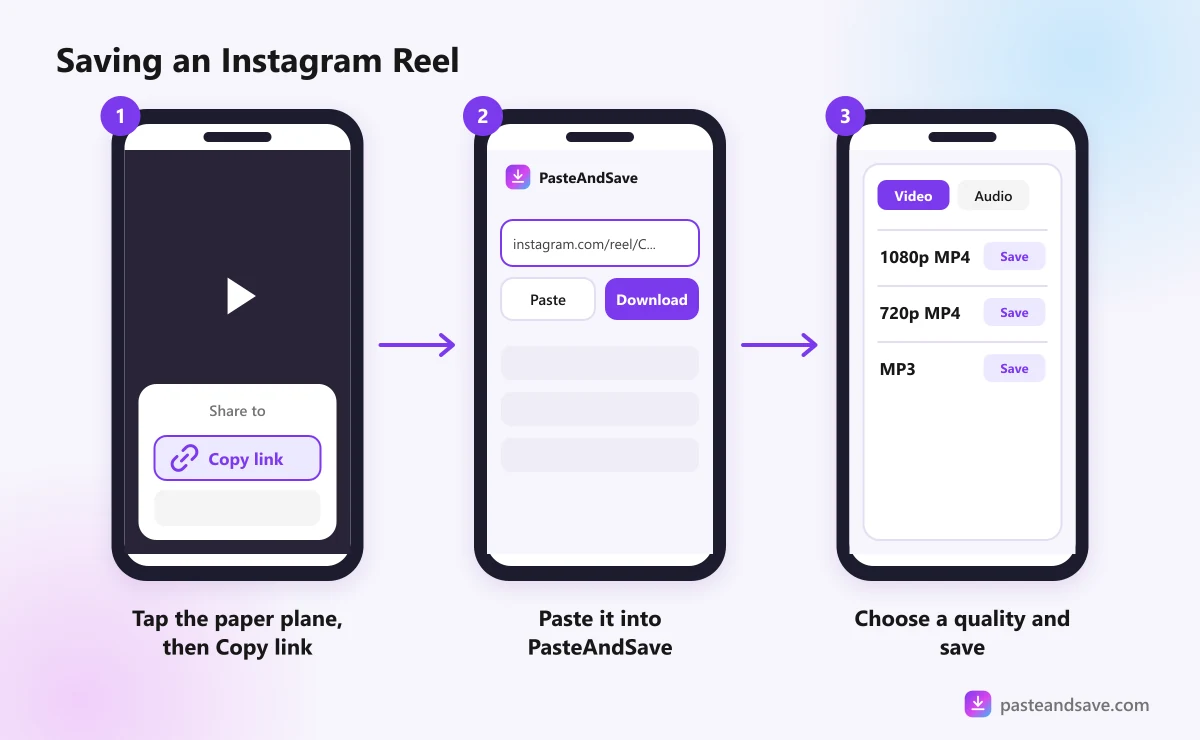
On iPhone, the file goes to Files, then Downloads. Open it, tap share and choose Save Video to put it in Photos. On Android it goes to the Download folder, which your gallery app picks up by itself.
How to download photos and carousels
Copy the post's link the same way, from the paper plane or the three dots, and paste it in. A single photo post shows one image in full resolution. A carousel lists its items one by one, so you can save the one you want or all of them.
How to download a Story
- Open the Story on a public account.
- Tap the paper plane or the three dots, then Copy link. If there is no copy option, the account is private or the Story can't be shared.
- Paste the link into the downloader.
Stories stay up for 24 hours, then the link stops working. If you want one, save it the same day.
Keep only the audio
Reels are where a lot of new music and voice clips first show up. To keep just the sound, paste the link and open the Audio tab. MP3 plays everywhere. M4A keeps the original sound without converting it. The MP3 guide explains the bitrate options.
Why some Instagram posts won't download
The downloader sees Instagram the way someone who isn't logged in sees it. That is deliberate: we never ask for your Instagram password, and nor should any download site. It also means:
- Private accounts are out of reach. Their posts are only shown to approved followers.
- Some posts need a login to view at all. Instagram sometimes hides posts from logged out visitors. When that happens you will see "This Instagram post can only be seen when signed in, or it's private."
- Deleted posts are gone. The link may still open, but there is nothing behind it.
- Expired Stories can't be fetched. After 24 hours they are no longer public.
If a post opens fine in a private browser window on your phone, with no login, it will almost always work in the downloader too. That is a quick way to check. The troubleshooting guide covers every message in detail.
A word on reposting
Downloading a Reel to watch later or keep for reference is one thing. Posting it on your own account is another, and credit in the caption doesn't make it okay. If you want to share someone's Reel, use Instagram's own share button, or ask them first. The legal guide explains why.
Got a Reel in mind? Paste its link into the Instagram downloader or the Reels downloader.
Ready to try it?
Free, no sign up, works on any phone or computer.
Advertisement
Questions people ask
Can I download Instagram Reels with the music?+
Yes. A downloaded Reel keeps its sound, music included. If you only want the audio, open the Audio tab after pasting the link and save it as MP3 or M4A.
Why can't I download a Reel from a private account?+
Private posts are only shown to approved followers who are logged in. A downloader sees Instagram as a visitor who is not logged in, so private Reels, Stories and posts stay out of reach.
How do I download every photo in an Instagram carousel?+
Paste the post's link once. The items in the carousel are listed one by one, so you can save each in full resolution without copying separate links.
Where do downloaded Reels go on iPhone?+
Safari puts them in the Files app, in the Downloads folder. Open the file, tap the share icon and choose Save Video to move it into Photos.