On this page
The download worked, the bar filled up, and now the video is nowhere to be found. It happens to almost everyone the first time, and the answer is nearly always the same: the file is in your Downloads folder, not in your photos yet.
Here is exactly where files go and how to get them where you want them.
On iPhone and iPad
Step 1: Download in Safari
Since iOS 13, Safari can download files by itself, so you don't need any app.
- Copy the video link from the app with Share, then Copy link.
- Open Safari and paste it into the downloader.
- Pick a quality. When Safari asks, tap Download.
A small arrow appears in Safari's address bar while the file downloads. Tap it any time to see your downloads.
Step 2: Find the file
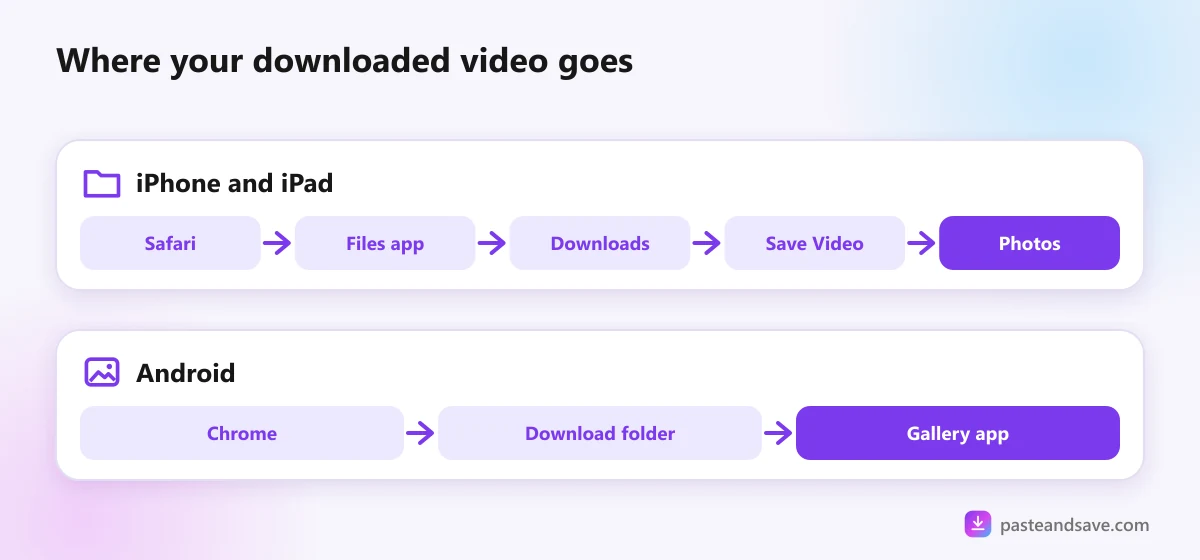
Downloads go to the Files app, in a folder called Downloads. Open Files, tap Browse, and look under iCloud Drive or On My iPhone. Which one depends on a setting: Settings, then Apps, then Safari, then Downloads. On older versions of iOS it is Settings, then Safari, then Downloads.
Tip: choose On My iPhone there if your iCloud storage is nearly full. Big videos fill it fast.
Step 3: Move it into Photos
- Open the video in Files.
- Tap the share icon, the square with an arrow.
- Tap Save Video.
It now sits in Photos with everything else. Delete the copy in Files afterwards, so the video doesn't take up space twice.
Using Chrome on iPhone?
Chrome asks what to do when the download finishes. Choose to save it to Files, then follow step 3 above.
On Android
Step 1: Download in Chrome
- Copy the video link from the app's Share menu.
- Open Chrome and paste it into the downloader.
- Pick a quality. A bar at the bottom shows the download.
Step 2: Find the file
Every download goes to the Download folder on your phone's storage. You can reach it three ways:
- Tap Open on the bar Chrome shows when it finishes.
- Open the Files app, often called Files by Google or My Files on Samsung, then Downloads.
- In Chrome, tap the three dots, then Downloads.
Step 3: See it in your gallery
Gallery apps scan the Download folder by themselves:
- Samsung Gallery shows it as an album called Download.
- Google Photos lists it under Collections, then On this device, then Download.
If it doesn't appear, open the file once from your Files app and it will be picked up.
Space, data and battery
- Use WiFi for big files. A 10 minute video in 1080p can be 300 MB or more. The video quality lesson has sizes for every quality.
- Pick 720p for phone viewing. It looks sharp on any phone screen and is about half the size of 1080p.
- Keep the screen on for long downloads. Some phones pause downloads when the screen locks for a while.
- Clear old downloads from time to time. The Downloads folder grows quietly in the background.
When a video won't play or won't save
- "This file can't be played" on iPhone: it is probably a WebM or MKV file. Download the MP4 version instead, or install the free VLC app, which plays nearly everything. The formats lesson explains why.
- No sound: try another quality. If you only want the sound, use the Audio tab and save an MP3.
- Safari says it can't download the file: check you have free space, then try again on WiFi.
- The download stops halfway: long videos take a while for our server to prepare. Leave the page open until the bar finishes.
Try it now
Copy any video link and paste it into the downloader. For app specific steps, see the guides for TikTok and Instagram.
Ready to try it?
Free, no sign up, works on any phone or computer.
Advertisement
Questions people ask
Where do downloaded videos go on iPhone?+
Videos downloaded in Safari go to the Files app, in a folder called Downloads. Depending on your settings it is under On My iPhone or under iCloud Drive. Tap the download arrow in Safari's address bar to jump straight to the file.
Why doesn't my downloaded video show up in Photos?+
Photos only shows videos you add to it. Open the video in the Files app, tap the share icon and choose Save Video, and it appears in Photos with your other videos.
How do I save a downloaded video to the gallery on Samsung?+
Downloads go to the Download folder, and Samsung Gallery shows that folder as an album, usually within a few seconds. If it doesn't, open My Files, find the video in Downloads and open it once.
Can I download videos on iPhone without an app?+
Yes. Safari can download files by itself since iOS 13. Paste the link into an online downloader, pick a quality, and Safari saves the file to the Files app with no extra app needed.