On this page
Facebook lets you save a video to a list inside Facebook, but not to your phone's gallery. For a recipe you want to cook from, a family clip or a talk you want to watch offline, a normal MP4 file is far more useful.
Here is how to get one from any public Facebook video or Reel.
What you can save from Facebook
- Videos on public Pages, such as news outlets, brands and creators.
- Reels from public accounts.
- Videos on public profiles, where the post is set to Public.
- Videos in public groups.
What you can't save is anything that needs a login to see: friends only posts, private groups, Stories and videos Facebook limits to signed in viewers. That is not a missing feature. PasteAndSave sees Facebook the way a visitor with no account does, and those videos are invisible to that visitor.
How to download on your phone
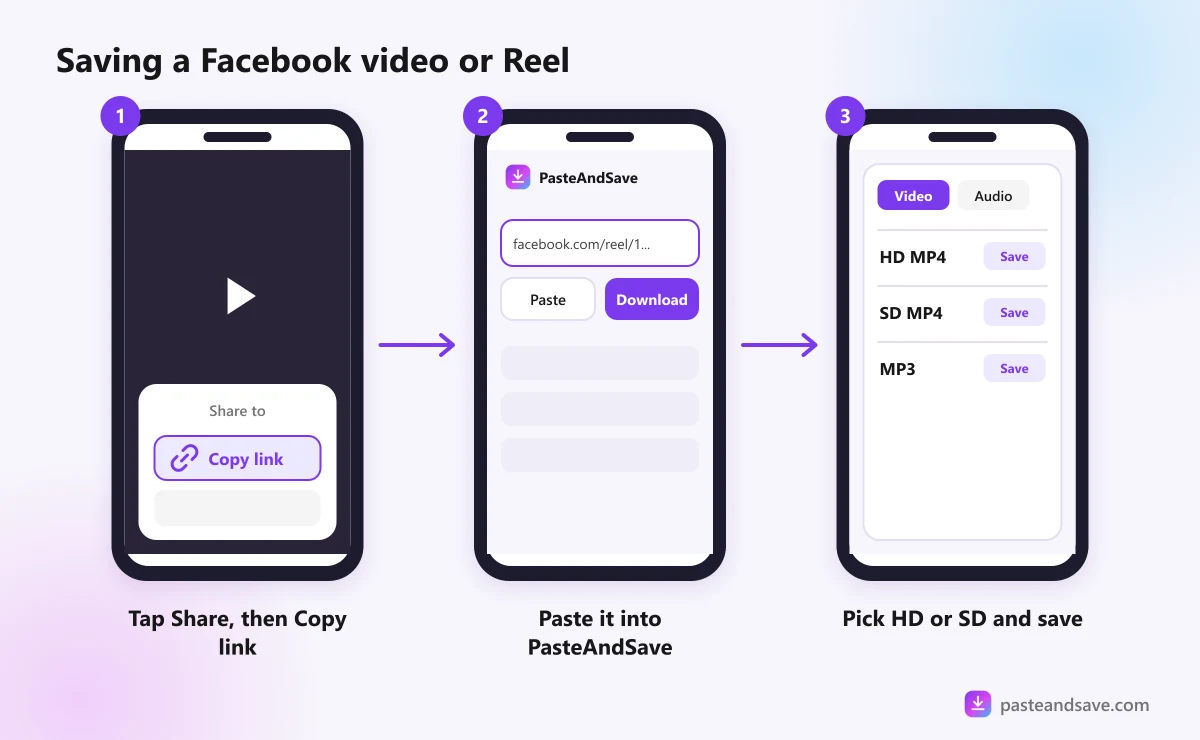
- In the Facebook app, find the video or Reel and tap Share.
- Tap Copy link.
- Open your browser and go to the Facebook downloader.
- Paste the link into the box and tap Download.
- Pick a quality and save it.
On iPhone, the video goes to the Files app, in Downloads. Open it, tap the share icon and choose Save Video to move it into Photos. On Android it lands in the Download folder, and your gallery shows it within a few seconds. The iPhone and Android guide has the details.
For Reels, the Facebook Reels downloader works the same way.
How to download on a computer
- Open the video on facebook.com.
- Click the three dot menu on the post, or the Share button, and choose Copy link. You can also click the video's date to open it on its own page and copy the address from the address bar.
- Paste the link into the Facebook downloader and press Download.
- Pick a quality. The MP4 saves to your downloads folder.
HD or SD?
Facebook doesn't always store a long list of sizes. Sometimes you see qualities like 1080p and 720p, and sometimes just two rows called HD and SD.
- HD is the sharper version, usually 720p or 1080p. Pick it for a laptop, a TV or anything you might edit.
- SD is a smaller copy, often 360p or 480p. Fine for a quick look on a phone, or when space and data are tight.
A video that was uploaded small stays small. If the list stops at SD, that is all Facebook has. The quality lesson explains why a downloader can't add detail that was never there.
Share links and fb.watch
When you tap Copy link in the Facebook app, you often get a short address, starting with fb.watch or facebook.com/share. These used to trip up downloaders, because they don't say which video they point to.
PasteAndSave follows these links to the real video address for you, so you can paste them as they are. If one ever fails, open the link in your browser, wait for the video page to load, and copy the full address from the address bar.
Why a Facebook video won't download
These are the messages you are most likely to see, and what each one means:
- "This Facebook video can only be watched when signed in, or it was taken down." The video is limited to logged in viewers, or it has been removed.
- "There's no video in this Facebook post that we can reach." The post is a photo or text, or only signed in viewers can see its video.
- "This video was removed or is no longer available." The owner deleted it, or Facebook took it down.
A live broadcast is easiest to save after it ends, once Facebook has turned it into a normal video. Every other message is explained in Why a Video Won't Download.
Before you repost
Facebook videos often travel far from the person who made them. Before you post one on your own Page or in a group, message the owner and ask. Most people say yes when you promise credit and a link back. The legal lesson has a short message you can copy.
Got a link? Paste it into the Facebook downloader.
Ready to try it?
Free, no sign up, works on any phone or computer.
Advertisement
Questions people ask
Can I download a Facebook video from a private group?+
No. Videos in private groups, friends only posts and Stories can only be seen by people who are logged in and allowed to see them. PasteAndSave never logs in to Facebook, so it can only save videos that anyone could watch without an account.
What is the difference between HD and SD on Facebook?+
HD is the sharper version, usually 720p or 1080p, and SD is a smaller copy, often 360p or 480p. Pick HD for anything you will watch on a bigger screen, and SD if you are short on space or mobile data.
Do fb.watch links work?+
Yes. Short links from Facebook's Share button, including fb.watch and facebook.com/share links, are followed to the real video address for you. If one ever fails, open it in your browser and copy the full address from the address bar.
Does the person who posted the video know I downloaded it?+
No. The video is fetched by our server, not through your Facebook account, so nothing about the download is linked to you. That does not change the rules about reusing it, so ask the owner before you post it anywhere.