
On this page
X, which most people still call Twitter, has no download button. You can bookmark a post, but if it is deleted, so is your bookmark. To keep a clip for good, you need the file.
The good news: every video, GIF and photo on a public post can be saved with one copied link.
Copy the post's link
The link you need is the address of the post itself:
- In the app: tap the Share icon under the post, then Copy link.
- On a computer: click the post's date or time to open it on its own page, then copy the address from the address bar. Or click Share, then Copy link.
A post link looks like x.com/ followed by the username, the word status and a long number. Links that start with twitter.com work just the same.
Save it on a phone
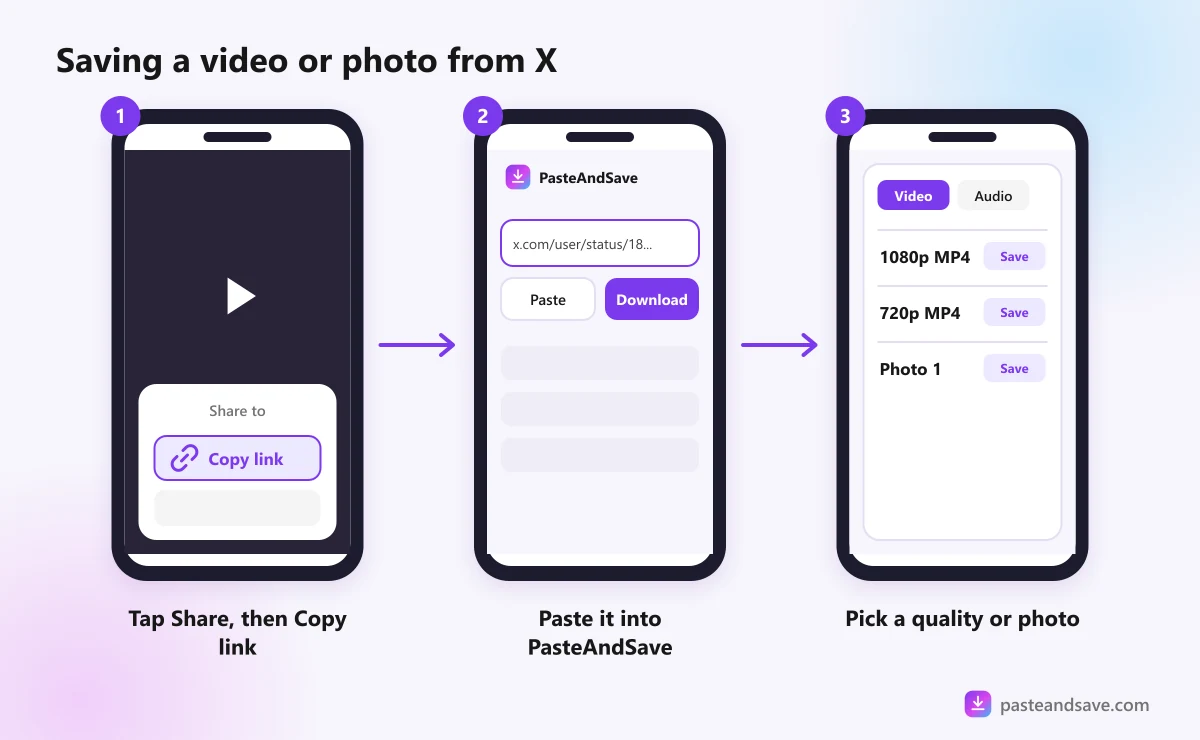
- Copy the post's link in the X app.
- Open your browser and go to the X video downloader.
- Paste the link and tap Download.
- Pick a quality and save it.
On iPhone, Safari puts the file in Files, then Downloads. Open it, tap share and choose Save Video to add it to Photos. On Android, the file goes to the Download folder and shows up in your gallery. The iPhone and Android guide has every step.
Save it on a computer
Paste the link into the X video downloader, press Download and pick a quality. The MP4 goes to your downloads folder. If you save from X often, the browser extension adds a download button so you can skip the copy and paste.
Which quality to pick
X stores most videos in a few sizes, usually up to 1080p, with smaller copies such as 720p and 480p for slow connections. The list shows whatever X has for that post.
- 1080p for a laptop, a TV or editing.
- 720p for watching on a phone, at about half the size.
- The Audio tab if you only want the sound, as MP3 or M4A.
GIFs are videos on X
This surprises almost everyone. When someone posts a GIF on X, X turns it into a short MP4 video with no sound. That is why a GIF from X downloads as an MP4.
It is not a mistake, and it is usually better: the MP4 is smaller and smoother than the GIF would be. It plays on a loop in most phone galleries. If you truly need a .gif file, for a chat app that only takes GIFs for example, any free GIF converter can change it back.
Photos
PasteAndSave saves photos from X too. Paste the link of a post with photos and each picture is listed on its own, at the size it was uploaded rather than a shrunken preview. Save the ones you want. In a post that has both photos and a video, the video is what gets listed.
When an X post won't download
- "There's no video in this X post that we can reach." The post is text only, it was marked as sensitive, which needs a login to view, or it was removed.
- "This one is private or needs a sign in." The account is protected, so only approved followers can see its posts.
- "This video was removed or is no longer available." The post was deleted, or the account no longer exists.
If the post quotes another post and the video sits in the quoted one, open the quoted post and copy its link instead. For every other message, see Why a Video Won't Download.
Credit the person who posted it
Clips on X spread fast, and the original poster often gets lost along the way. If you post a saved clip somewhere else, ask first and credit them by name. The legal lesson explains why credit alone is not permission.
Paste your link into the X video downloader to try it.
Ready to try it?
Free, no sign up, works on any phone or computer.
Advertisement
Questions people ask
Do twitter.com links still work?+
Yes. Links that start with twitter.com and links that start with x.com both work, and so do links copied from the app. They all point to the same post, so paste whichever one you have.
Why does a GIF from X download as an MP4?+
Because that is what it really is. X turns every GIF into a short silent MP4 video when it is posted, which is smaller and smoother. The file plays on a loop like a GIF in most players, and you can convert it back to a GIF with any free converter if you need one.
Can I download videos from a protected X account?+
No. Posts from protected accounts are visible only to approved followers who are logged in. PasteAndSave never logs in to X, so it can only save posts anyone could see without an account.
What quality are X videos?+
X keeps most videos at up to 1080p, along with smaller copies such as 720p and 480p for slow connections. The list shows every size X stores for the post, and a video uploaded small stays small.